
A-
A+
一些软件打开提示 could not find the webview2 runtime的问题解决方案
常用的一个软件,今天早上更新了一下,新版本无法打开,提示could not find the webview2 runtime错误。
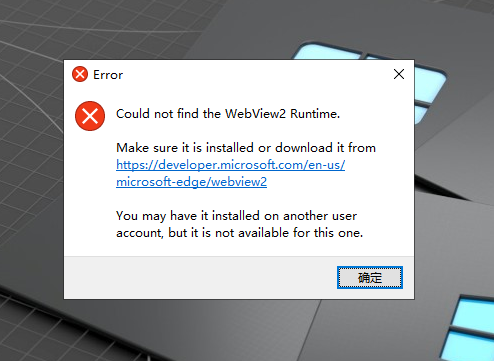
提示中的网址打开是英文的,https://developer.microsoft.com/en-us/microsoft-edge/webview2
打开以后,选择DOWNLOAD,然后点击 Evergreen Standalone Installer 下面的 X64下载。
或者选择中文版下载
https://developer.microsoft.com/zh-cn/microsoft-edge/webview2/?form=MA13LH#download-section

下载完成安装程序以后,运行一下,让自动安装完成就可以了(需要联网)
我这边提供了一个网盘下载:
我用夸克网盘给你分享了「MicrosoftEdgeWebView2RuntimeInstallerX64.exe」,点击链接或复制整段内容,打开「夸克APP」即可获取。
链接:https://pan.quark.cn/s/83482ab14765
通过网盘分享的文件:MicrosoftEdgeWebView2RuntimeInstallerX64.exe
链接: https://pan.baidu.com/s/1fIqcf-YwueMqVyoSNteMRA?pwd=s7ug 提取码: s7ug