
A-
A+
WordPress程序带的RSS订阅接口Feed API指向的域名变成非法BC网站,记得屏蔽Feed功能。
看到有人接到服务器厂商的通知,让清理非法内容,仔细一看是源代码中的RSS订阅接口Feed API接口中的域名变成了非法内容。
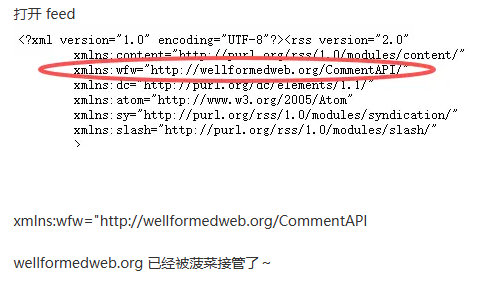
这个代码位置说一下:\wp-includes\feedrss2.php里
xmlns:wfw="http://wellformedweb.org/CommentAPI
一般Feed接口也用不到,建议大家屏蔽就可以了。
wellformedweb.org 已经被非法组织接管了~
方法如下:
1.安装插件 Disable Feeds WP
2.代码禁用
代码禁用,在主题的 functions.php 文件中添加以下代码:
// 禁用所有 Feed
function disable_all_feeds() {
    wp_die(
        '<h1>本站已禁用订阅功能</h1>
        <p>请直接访问网站获取最新内容。</p>
        <p><a href="' . home_url() . '">返回首页</a></p>',
        '订阅已禁用',
        array('response' => 403)
    );
}

// 禁用 RSS、Atom、RDF 等所有 Feed
add_action('do_feed',      'disable_all_feeds', 1);
add_action('do_feed_rdf',  'disable_all_feeds', 1);
add_action('do_feed_rss',  'disable_all_feeds', 1);
add_action('do_feed_rss2', 'disable_all_feeds', 1);
add_action('do_feed_atom', 'disable_all_feeds', 1);

// 禁用评论 Feed
add_action('do_feed_rss2_comments', 'disable_all_feeds', 1);
add_action('do_feed_atom_comments', 'disable_all_feeds', 1);

// 移除 head 中的 Feed 链接
remove_action('wp_head', 'feed_links', 2);
remove_action('wp_head', 'feed_links_extra', 3);
3.直接删除那行代码也可以,最简单。
4.Nginx屏蔽。
编辑站点 Nginx 配置,放入 server { } 内部:
# 屏蔽 WordPress Feed,返回404
location ~* ^/(feed|comments/feed)(/.*)?$ {
    return 404;
}
宝塔面板,找到站点,设置,配置文件,拉到底,在最后一个}前面粘贴就行。
其实我以前也发过类似文章,建议屏蔽。
如何彻底移除并关闭WordPress的RSS也就是feed订阅功能?